MetalwareBinary analysis and emulation
Binary input
Metalware automatically reconstructs the environment a compiled binary was built for, without hardware or source code.
Configuration
Upload a binary and go
Metalware configures everything needed to emulate and analyze your firmware.
Upload binaries with or without debug symbols. Get actionable results, evidence, and tools to understand and fix flaws in your firmware.
Emulation
Emulation: better results, less noise.
Metalware automatically creates a custom, highly instrumented emulator for each binary, enabling high fidelity testing, verification, and reproducibility.
Understandability
Visibility for every part of your system
Sometimes teams don't have the full context for the firmware they're responsible for. This could include third-party firmware or a legacy binary you inherited.
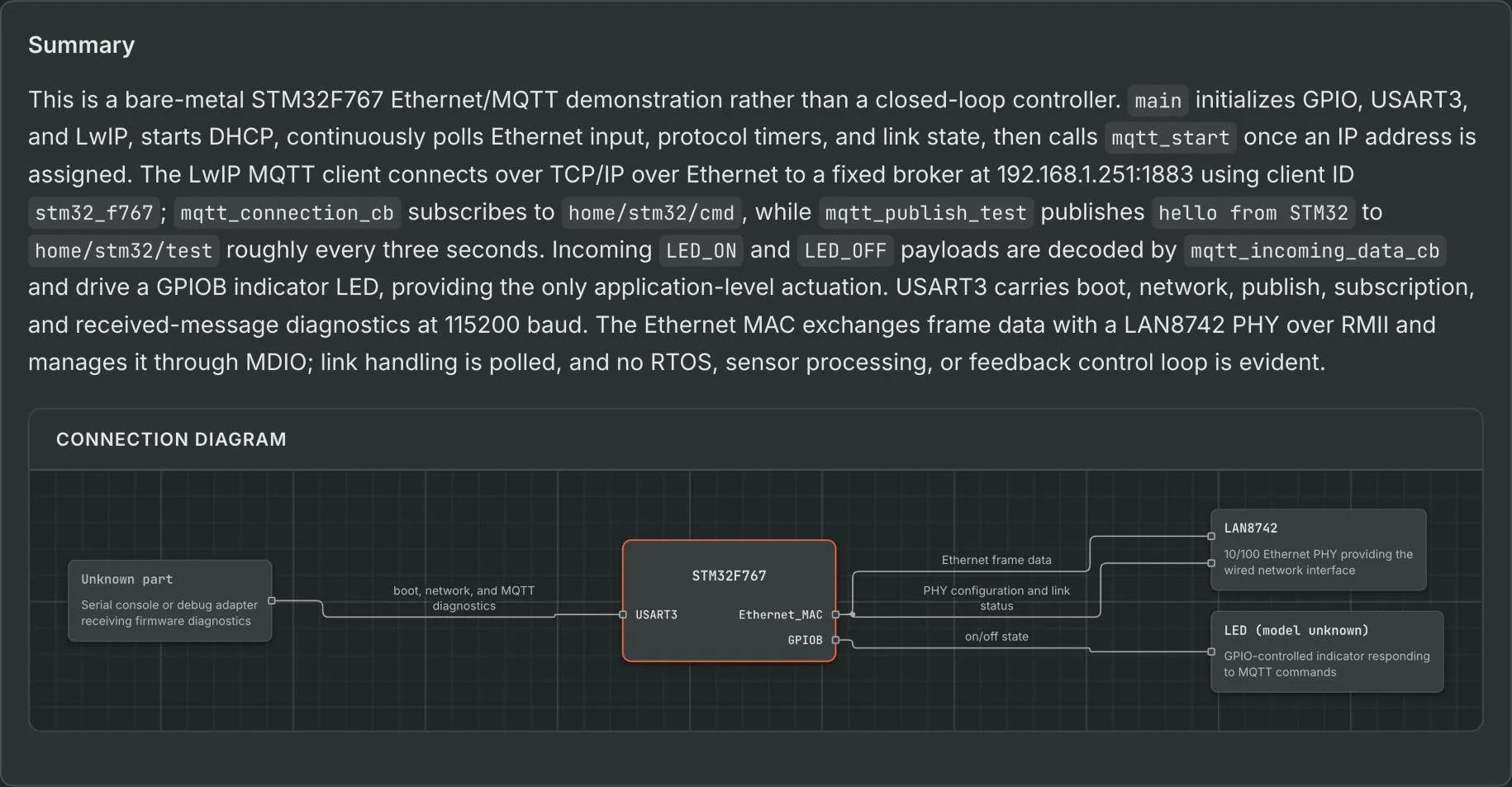
For every binary, Metalware provides an overview of how the firmware works, what it does, and a diagram showing its interfaces.
Keep reading
Read next
Research
- Automating Peripheral Map Discovery on Monolithic Firmware Recovering the peripheral map of an unknown chip from its firmware alone.
- A high-throughput model for recovering global objects in monolithic firmware A model trained to recover global objects in stripped firmware.
- How We're Automating Firmware Fuzzing How Metalware works out what a binary is, sets up an emulator and fuzzes it.